
Key Takeaways
- Your title tag and H1 are the highest-leverage on-page elements. Get these right first.
- Internal links distribute authority and help Google understand your site structure.
- Page speed and mobile friendliness are confirmed ranking factors. Check both before every publish.
- Schema markup makes your content eligible for rich results, which can significantly boost CTR.
- Readability and content depth matter as much as technical optimization in 2026.
Publishing a piece of content without running through an on-page SEO checklist is like sending an email without a subject line. The content might be excellent, but you are making it harder for the right people to find it. On-page SEO is not about gaming algorithms. It is about making your content as clear, accessible, and useful as possible, for both search engines and the humans who use them.
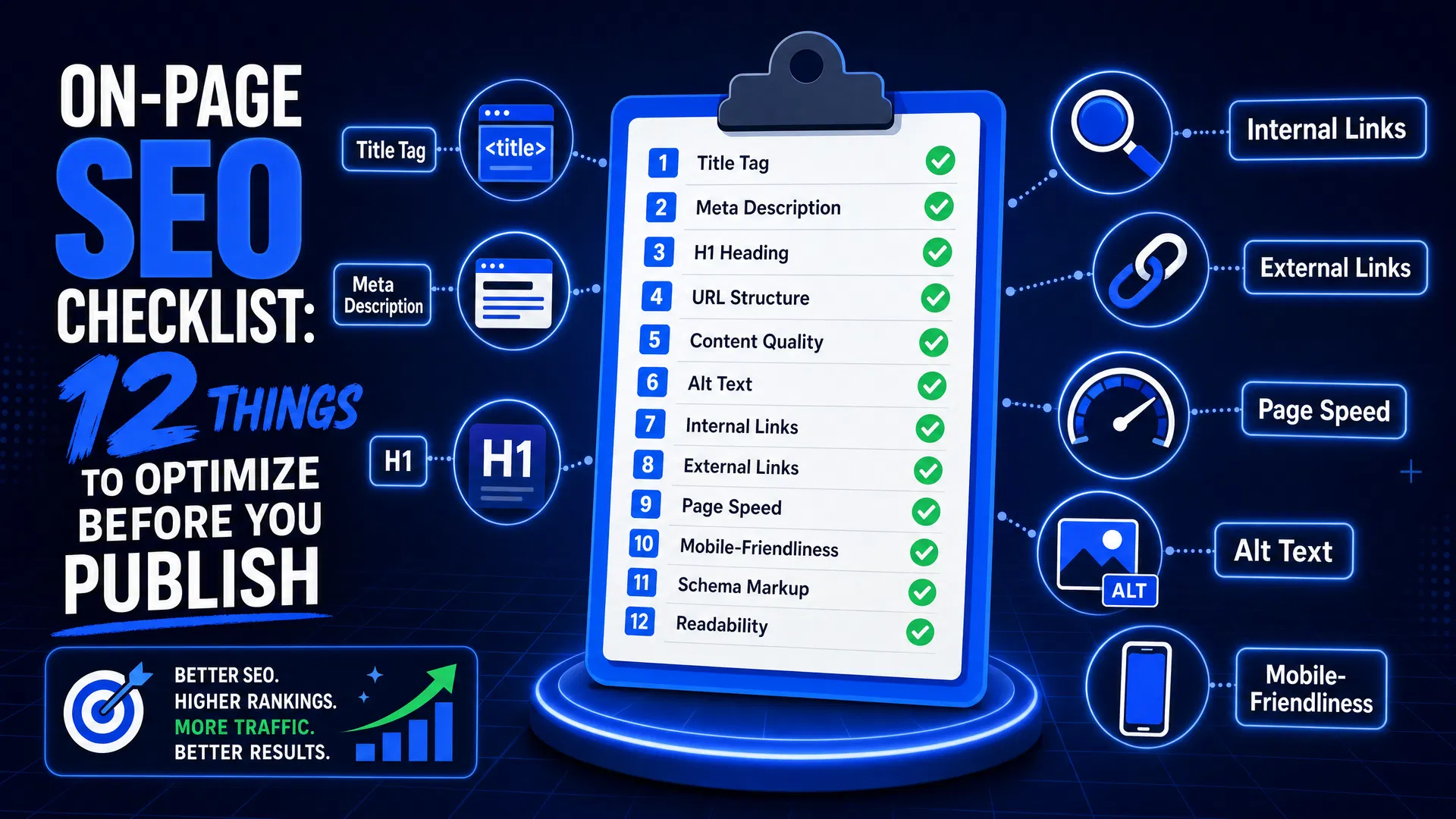
This checklist covers the 12 most impactful on-page factors. Work through it before every publish and you will consistently give your content the best possible chance of ranking. If you are looking to understand how these factors fit into a broader keyword research and content planning workflow, RankPilot handles most of this analysis automatically so you can focus on the writing.
Title Tag
Your title tag is the single most important on-page SEO element. It tells Google what the page is about and it is what users see in search results. Keep it between 50 and 60 characters so it does not get truncated. Put your primary keyword near the front, not buried at the end. Avoid keyword stuffing — one clear, descriptive title beats a list of terms every time.
Pro tip: Write your title for humans first. If it reads naturally and includes your keyword, it will perform well in search.
Meta Description
The meta description does not directly affect rankings, but it has a huge impact on click-through rate. Think of it as your 155-character sales pitch. Summarize what the page covers, hint at the value the reader gets, and include your primary keyword naturally. Google sometimes rewrites meta descriptions, but writing a good one gives you the best chance of controlling what searchers see.
Pro tip: Include a soft call to action in your meta description. Phrases like "Here is how" or "Find out why" consistently improve CTR.
H1 Heading
Every page should have exactly one H1. It should match or closely mirror your title tag, and it should contain your primary keyword. The H1 is the first heading a visitor sees and it anchors the rest of your heading structure. A common mistake is using a decorative headline as the H1 while burying the actual topic further down the page.
URL Structure
Short, descriptive URLs outperform long, parameter-heavy ones in both rankings and click-through rate. Use your primary keyword in the URL slug, separate words with hyphens (not underscores), and remove stop words like "a", "the", and "and". A URL like /on-page-seo-checklist is far more useful to Google and users than /blog/post?id=4829.
Pro tip: Once a URL is indexed and receiving traffic, avoid changing it. If you must change it, set up a 301 redirect from the old URL.
Keyword Placement and Density
Your primary keyword should appear in the first 100 words of the article, in at least one subheading, and naturally throughout the body. Do not obsess over a specific density percentage — Google has moved well beyond counting keyword frequency. What matters is that the page clearly covers the topic. Use your primary keyword where it reads naturally, and rely on related terms and semantic keywords to fill out the topical coverage. For a deeper look at how related terms work, see our guide on
Image Alt Text
Every image on the page should have a descriptive alt attribute. Alt text serves two purposes: it helps visually impaired users understand the image, and it gives Google additional context about the page content. Describe what is actually in the image, include your keyword where it fits naturally, and keep it under 125 characters. Never use "image of" or "photo of" as a prefix — just describe the subject directly.
Pro tip: Compress images before uploading. Oversized images are one of the most common causes of slow page load times, which hurts both rankings and user experience.
Internal Links
Internal links distribute authority across your site and help Google understand how your content is related. Every new piece of content should link to at least two or three other relevant pages on your site, and those existing pages should link back to the new one where relevant. Use descriptive anchor text that tells both users and search engines what the linked page is about. Avoid generic anchors like "click here" or "this article". For example, linking to your keyword research workflow is more useful than linking to "our tool".
Pro tip: After publishing, go back to your three most-visited pages and add a contextual internal link to the new post. This passes authority from established pages to new ones.
Heading Hierarchy (H2, H3)
Subheadings break up long content and signal structure to both readers and crawlers. Use H2 tags for major sections and H3 tags for subsections within those. Include secondary keywords and related phrases in your subheadings where they fit naturally. A well-structured heading hierarchy makes your content easier to scan, which reduces bounce rate, and easier to parse, which improves how Google understands the page.
Page Speed
Page speed is a confirmed Google ranking factor, and it has a direct impact on conversion rates. A one-second delay in load time can reduce conversions by up to 7%. Before publishing, run your page through Google PageSpeed Insights and address the top issues. The most common culprits are uncompressed images, render-blocking JavaScript, and missing browser caching headers. You do not need a perfect score, but you should aim for a mobile score above 70.
Pro tip: Use next-gen image formats like WebP. They are typically 25 to 35 percent smaller than JPEG at equivalent quality.
Mobile Friendliness
Google uses mobile-first indexing, which means it crawls and ranks the mobile version of your page. If your content is harder to read, navigate, or interact with on a phone than on a desktop, your rankings will suffer. Check that text is readable without zooming, buttons and links are large enough to tap, and there are no horizontal scroll issues. Use Google's Mobile-Friendly Test tool to confirm before publishing.
Schema Markup
Schema markup is structured data that helps Google display rich results in search, such as star ratings, FAQs, how-to steps, and article metadata. For blog posts, at minimum add Article schema with the author name, publish date, and headline. For product or service pages, add the relevant schema type. Schema does not guarantee rich results, but it makes your content eligible for them, which can significantly improve click-through rates from search.
Pro tip: Use Google's Rich Results Test to validate your schema before publishing. It shows exactly which rich result types your page is eligible for.
Readability and Content Depth
Google's Helpful Content system rewards pages that genuinely satisfy the searcher's intent. Before publishing, ask: does this page fully answer the question? Does it go deeper than the top-ranking results in at least one meaningful way? Aim for short paragraphs (3 to 4 sentences), active voice, and a reading level appropriate for your audience. Use the Flesch-Kincaid readability score as a rough guide. Most successful SEO content sits between grade 7 and grade 10. Running a regular content audit helps you catch pages that have drifted below this standard over time.
Stop Checking Boxes Manually
RankPilot runs this checklist automatically on every piece of content you create, so you can focus on writing instead of auditing.
Common mistake
Optimizing for a keyword your page does not actually cover in depth. Keyword stuffing a thin page will not help it rank. Google's ranking systems evaluate whether the content genuinely satisfies the search intent behind the keyword, not just whether the keyword appears. If your page cannot fully answer the question, expand it before optimizing it.
Putting It All Together
The 12 items on this checklist are not independent. They reinforce each other. A well-written title tag drives higher click-through rates, which signals to Google that the page is relevant, which improves rankings, which drives more traffic. Internal links pass authority from your established pages to new ones, accelerating how quickly new content gets indexed and ranked. Schema markup makes your content eligible for rich results, which increases visibility even for pages ranking in positions 4 through 10.
The goal is not perfection on every point before every publish. It is consistency. A page that scores 10 out of 12 on every publish will outperform a page that scores 12 out of 12 once and 4 out of 12 the next time. Build this checklist into your publishing workflow and treat it as a non-negotiable final step, the same way you would a spell check.
If you are managing a large content library, a periodic content audit is the best way to apply these principles retroactively to existing pages. Many sites have significant ranking potential locked in older content that was published before these optimizations were in place. Revisiting and updating those pages is often faster and more effective than publishing new ones.
For teams that publish frequently, automating the checklist is worth the investment. RankPilot's content optimization workflow scores every page against these criteria in real time, flags issues before you publish, and suggests specific improvements rather than generic advice. The goal is to make on-page SEO feel less like a chore and more like a natural part of writing.
Good to know
On-page SEO is one part of a three-part equation. Technical SEO (site speed, crawlability, indexing) and off-page SEO (backlinks, brand mentions, authority) also affect rankings. This checklist covers the on-page layer. If you are seeing strong on-page scores but weak rankings, the bottleneck is likely technical or off-page.
Frequently Asked Questions
Related Articles
What Are Semantic Keywords and Why Do They Matter for SEO?
Semantic keywords help Google understand the full context of your content. Here is what they are and how to use them effectively.
May 29, 2026Content StrategyHow to Do a Content Audit in 90 Minutes Using AI Tools
A step-by-step framework for auditing your entire content library in under two hours using RankPilot.
April 11, 2026AI ToolsThe Role of AI Tools in SEO Audits: What to Expect in 2026
AI is changing how SEO audits are done. Here is what modern AI-powered audit tools can and cannot do.
January 21, 2026